Even further refining ∞
After creating the Artist/Genre files from all the large CD album files, we’ll import them to a database for further processing. To keep things simple we’ll use SQLite. The best free UI tool I know of for managing SQLite file is TkSQLite which is available for all platforms.
Note: Update 2026: This post was written many years ago and the above link is long dead. These days I would suggest going for DB Browser for SQLite or dbeaver
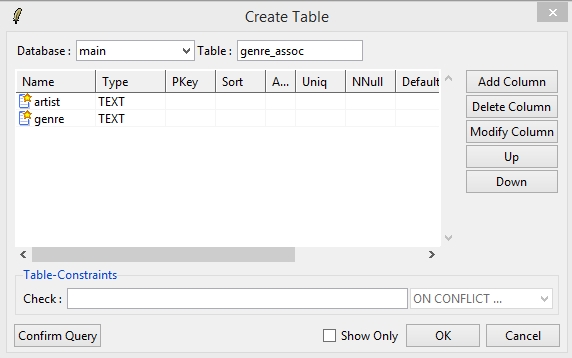
First Create the table schema for importing the Artist/Genre pairs as follows via Database->Create Table…
Use File->Import->Text File… to import all the artist-genre association files that were generated in the previous step (I’d suggest aggregating them all into one file instead of repeatedly importing each file). Use the following settings to correctly import the CSV file to the table:
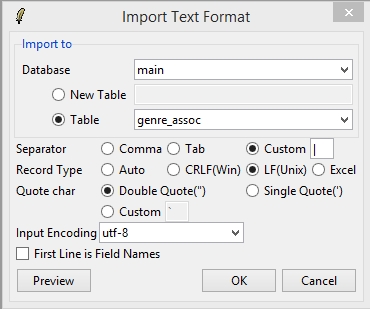
Note the above may take some time due to the number of rows involved.
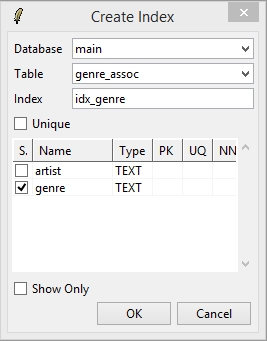
So that queries won’t take forever, add an index to the artist and the genre fields (via Database->Create Index…), for example:
Starting to look at the data ∞
Now that we have all the Artist-Genre associations that were submitted in our database, we can view the genre distribution for each artist. The following shows the query that generates this information for the artist Tom Jones:
SELECT artist,genre,COUNT(genre) AS gcount
FROM genre_assoc
WHERE artist='Tom Jones'
GROUP BY artist, genre
ORDER BY artist, gcount DESC;
and the result is:
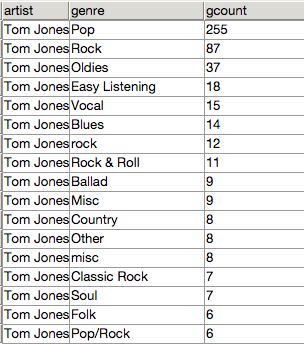
To further process this data, it would be best to create this data for all the artists:
CREATE TABLE genre_distributions AS
SELECT artist, genre, COUNT(genre) AS gcount
FROM genre_assoc
GROUP BY artist, genre
ORDER BY artist, gcount DESC;
Remember modify the schema and set gcount to be an INTEGER and also add indices for all the fields.
Now checking out the genre distribution for CD information submitted for the artist Sting returns the following:
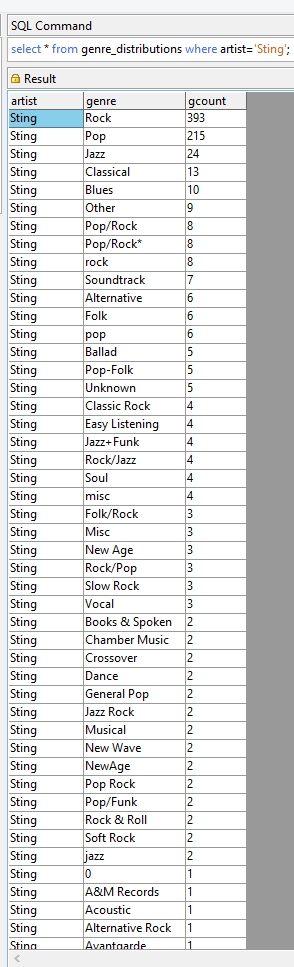
One obvious point that can be noted from the above result is that the data should be cleaned if we want to get higher quality results. “Rock”, “rock” and “Rock & Roll” could all be put under one genre. The cleaning process can be partly automated either by scripts or tools made for such tasks, such as OpenRefine (previously Google Refine).
Visualizing correlations and similarities between different Artists ∞
Now let’s see if based only on this data we can make something which is similar (at least in concept if not in quality) to what has been created in liveplasma discovery engine
For this, we’ll want to normalise the absolute number of associations of an artist with a genre so that we can compare two artists which have a similar genre combination but don’t have the same popularity and therefore don’t have a similar number of submissions.
Since I don’t like long nested SQL queries, we’ll achieve this by creating another table that contains the total number of genre submissions for each artist.
CREATE TABLE submissions_count AS
SELECT artist, COUNT(artist) AS total
FROM genre_assoc
GROUP BY artist
Again, after the table is created, change the type of the “total” field to INTEGER and add indices to all the fields.
Now to create the table with the normalized associations of genre types for each artist:
CREATE TABLE normalized_genre_distributions AS
SELECT T1.artist, T1.genre, T1.gcount*1.0/T2.total AS weight
FROM genre_distributions AS T1, submissions_count AS T2
WHERE T1.artist=T2.artist;
Again, change the type of the “weight” field (to FLOAT this time) and add indices to the artist and genre fields.
Now if we search to find Sting’s genre fingerprint, we get:
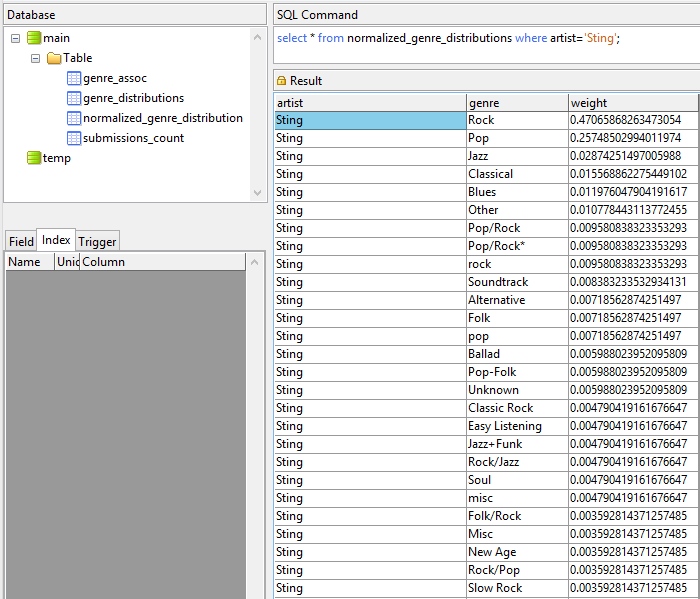
Now that we have a normalised genre distribution for each artist, we can start asking how similar two artists are to each other based on the genres they were associated with. Interested? On to part 3